> ## Documentation Index
> Fetch the complete documentation index at: https://moengage-unity-sdk-initialization-split.mintlify.site/llms.txt
> Use this file to discover all available pages before exploring further.
# LiftIgniter
## Introduction
[LiftIgniter](https://www.liftigniter.com/) applies machine learning to first-party behavioral data (without invading privacy) to personalize product and content recommendations on your site.
## MoEngage and LiftIgniter
With the MoEngage and LiftIgniter integration, you can send personalized content recommendations inside MoEngage campaigns to boost adoption and click-through rates.
## Integration
**Prerequisites**
* Your LiftIgniter API token (required to call their APIs).
* Your LiftIgniter JavaScript key.
Using MoEngage's Content APIs, you can dynamically pull recommendations into MoEngage campaigns for a more personalized experience.
### Step 1: Set up a MoEngage Content API
1. Navigate to **Settings** > **Advanced settings** > **Content API**. Click **+ Add content API** in the upper-right corner of the Content API screen. 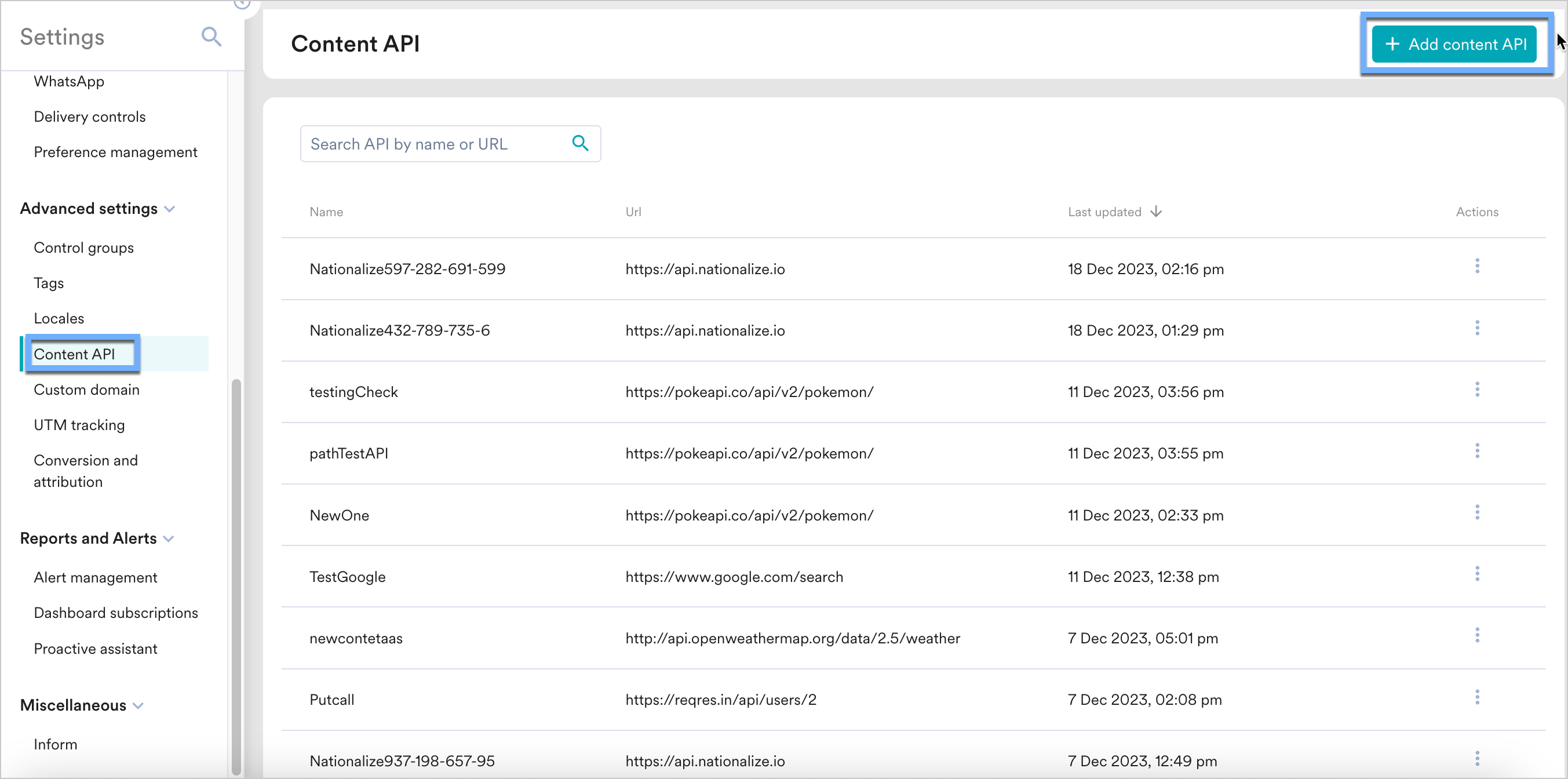 2. Add your LiftIgniter API to the endpoint URL. The endpoint changes depending on your use case.
  To display recommendations for your customers, use LiftIgniter's [Model Query API](https://documenter.getpostman.com/view/2166502/liftigniter-api-collection/7TFGvSV#340404f6-68fd-4844-90d9-7b93994440b9). When setting up your Content API, insert the following URL:
```text wrap theme={null}
https://query.petametrics.com/v3//{{UserAttribute['ID']}}/model
```
Replace `` with your [JavaScript key](https://console.liftigniter.com/settings/keys). Leave the URL parameters empty.
3. Under **Headers**, add the following:
* `x-api-key`: Your [LiftIgniter API key](https://documenter.getpostman.com/view/2166502/liftigniter-api-collection/7TFGvSV#intro).
* `Content-Type`: `application/json`.
4. Click **Save**, then click **Done** once you see a successful response.
Test the API directly from MoEngage. From the Content API's action menu, click **Test** to see the response and validate your setup.
### Step 2: Display your recommendations inside MoEngage campaigns
To use the API in your MoEngage campaigns:
1. On step 2 of campaign creation, type `@`.
2. In the personalization pop-up, select the LiftIgniter Content API you configured in Step 1.
3. Use the [MoEngage Templating Language](https://www.moengage.com/docs/user-guide/campaigns-and-channels/getting-started/message-personalization/jinja-templating-language) to parse the API response and use the content in your campaign.
To display recommendations for your customers, use LiftIgniter's [Model Query API](https://documenter.getpostman.com/view/2166502/liftigniter-api-collection/7TFGvSV#340404f6-68fd-4844-90d9-7b93994440b9). When setting up your Content API, insert the following URL:
```text wrap theme={null}
https://query.petametrics.com/v3//{{UserAttribute['ID']}}/model
```
Replace `` with your [JavaScript key](https://console.liftigniter.com/settings/keys). Leave the URL parameters empty.
3. Under **Headers**, add the following:
* `x-api-key`: Your [LiftIgniter API key](https://documenter.getpostman.com/view/2166502/liftigniter-api-collection/7TFGvSV#intro).
* `Content-Type`: `application/json`.
4. Click **Save**, then click **Done** once you see a successful response.
Test the API directly from MoEngage. From the Content API's action menu, click **Test** to see the response and validate your setup.
### Step 2: Display your recommendations inside MoEngage campaigns
To use the API in your MoEngage campaigns:
1. On step 2 of campaign creation, type `@`.
2. In the personalization pop-up, select the LiftIgniter Content API you configured in Step 1.
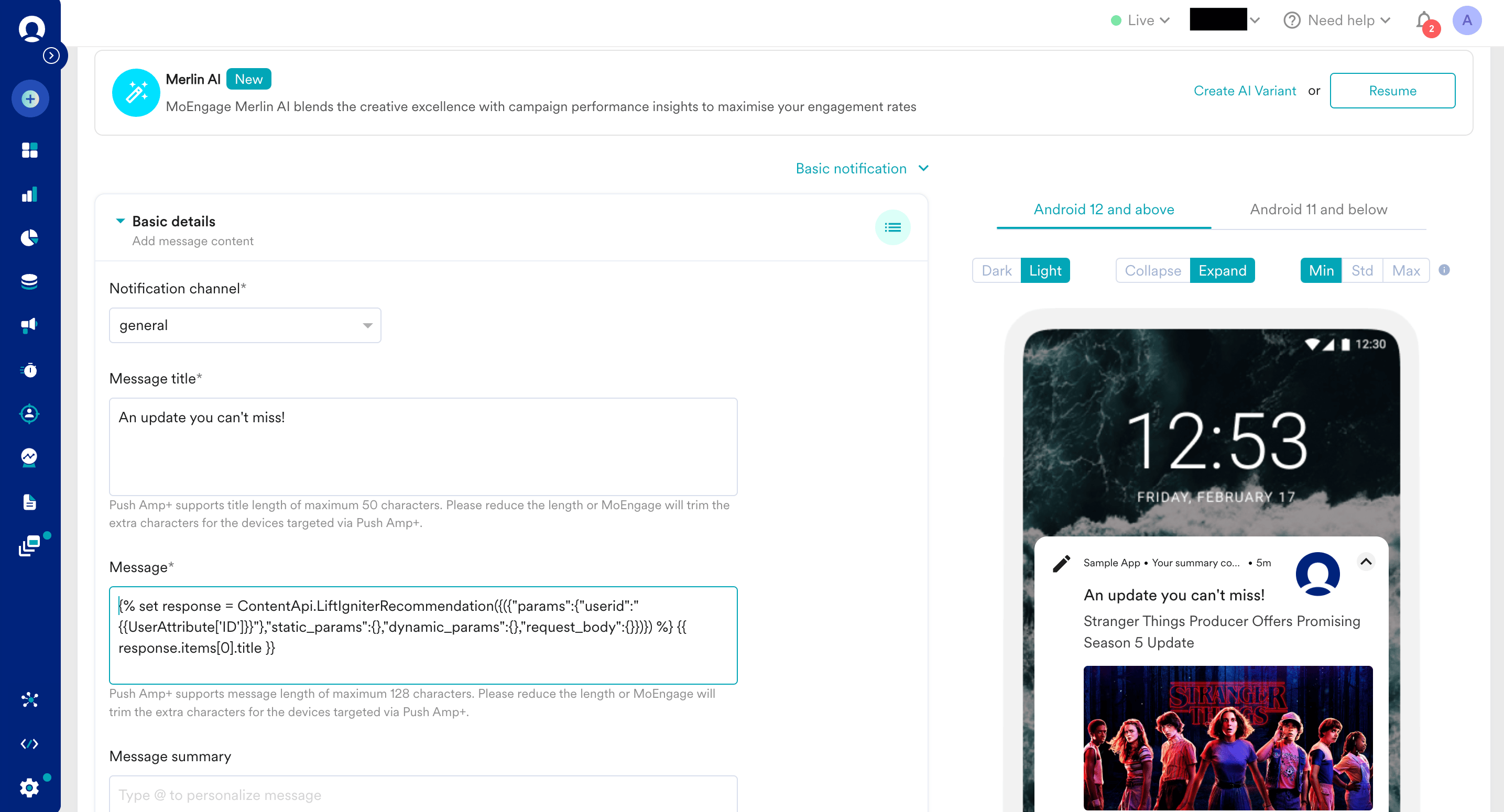
3. Use the [MoEngage Templating Language](https://www.moengage.com/docs/user-guide/campaigns-and-channels/getting-started/message-personalization/jinja-templating-language) to parse the API response and use the content in your campaign. 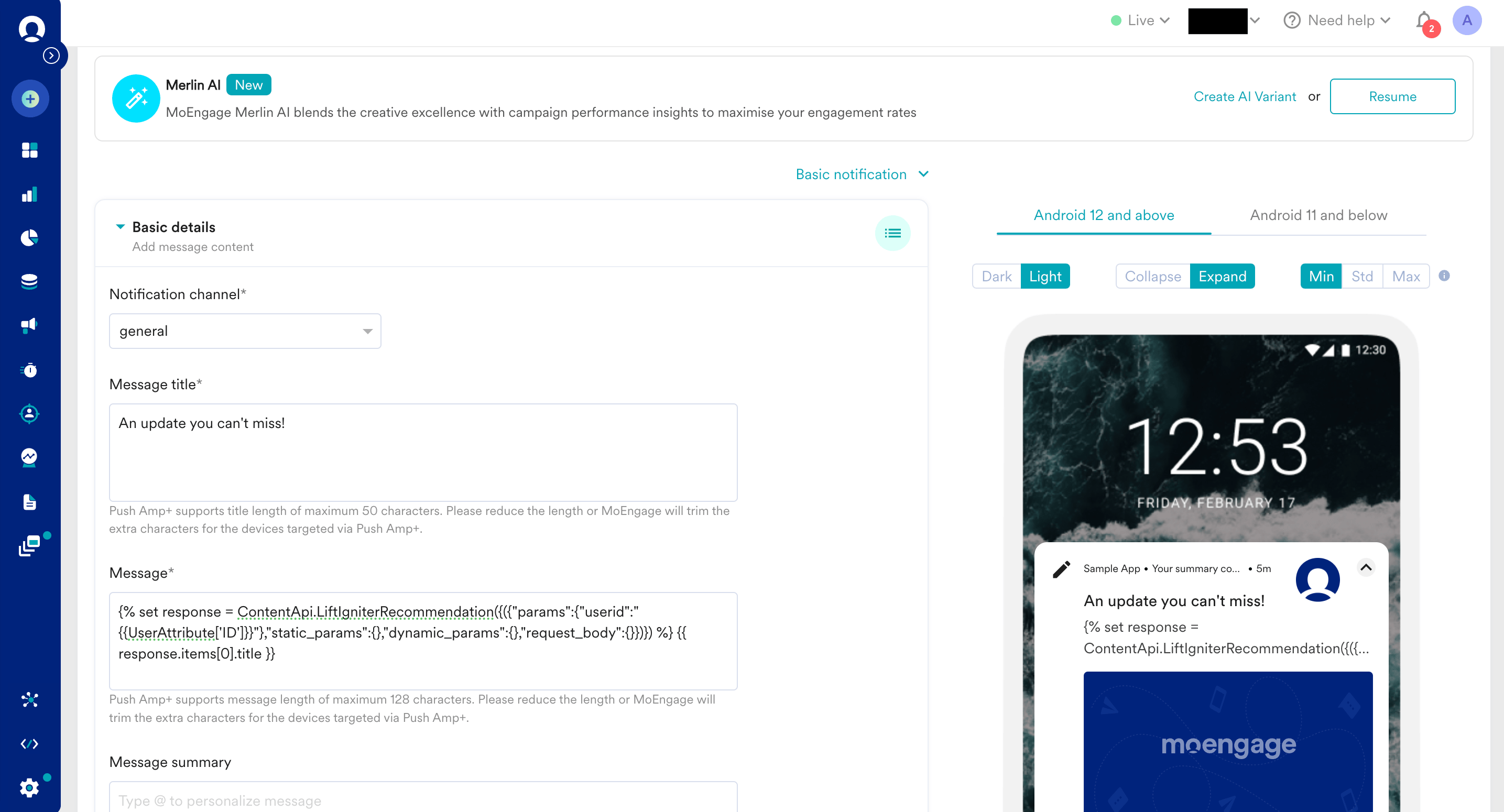 4. Click the **Personalized** tab under **Preview type** to view your campaign with real-time personalization.
  5. Publish the campaign.
Recipients see content blocks rendered with personalized LiftIgniter recommendations matched to their user ID.
5. Publish the campaign.
Recipients see content blocks rendered with personalized LiftIgniter recommendations matched to their user ID.