> ## Documentation Index
> Fetch the complete documentation index at: https://moengage-unity-sdk-initialization-split.mintlify.site/llms.txt
> Use this file to discover all available pages before exploring further.
# Merlin AI Jinja Assistant
> Simplify dynamic content creation with the Merlin AI Jinja Assistant. Describe your personalization logic in plain English to get working Jinja code.
# Introduction
Merlin AI Jinja Assistant is designed to simplify the implementation of dynamic content for your campaigns by generating personalized Jinja code with clear explanations from your natural language queries.
## Use Cases
Effective campaign performance is reliant on dynamic content and personalization. Even with limited technical proficiency in Jinja coding, using the Merlin AI Jinja assistant, you can:
* **Generate complex logic**: You can describe your desired personalization in plain English, and the Merlin AI Jinja assistant generates the complex Jinja code.
* **Reduce errors**: The generated Jinja code is optimized for MoEngage's Jinja, leading to fewer errors than manual writing. Additionally, you can regenerate the code with an error reference if you encounter any issues.
* **Reduce technical dependency**: It empowers advanced personalization while minimizing dependence on technical teams.
* **Enhance understanding**: Every piece of generated code has an explanation that helps you understand and learn Jinja more effectively.
- The Merlin AI Jinja Assistant generates logic-driven Jinja code for user attributes, event data, product recommendations, and personalization types to ensure that messages are uniquely relevant to each user's context.
- To generate accurate Jinja code, you must use a structured prompt and write your logic in plain English, and specify the personalization type and attribute name in your request. Refer to the [Inspiration Library for Merlin AI Jinja Assistant](/user-guide/ai-and-intelligence/merlin-ai/merlin-ai-jinja-generator/inspiration-library-for-merlin-ai-jinja-assistant) to learn best practices.
# Dynamic Personalization Types
The following is the list of dynamic personalization types:
| Dynamic content | Description |
| -------------------------------------- | ------------------------------------------------------------------------------------------------------------------------------------------------------------------------------------------------------------------------------------------------------------------------------------------- |
| User attribute | User attributes are the user properties stored for each user. |
| Event attribute or campaign attributes | Event attributes are available only for event-triggered campaigns. You can add personalization by using the specific attribute value associated with the event trigger campaign. |
| Product set or recommendation set | MoEngage’s recommendation system suggests products, content, or other items based on the recommendation setup and items available in the respective configured catalog. A product set returns a set of items. You can add specific available item attributes in Jinja for personalization. |
# Generate Jinja Code
To generate Jinja code using the Merlin AI Jinja Assistant, perform the following steps:
1. On the left navigation menu in the MoEngage dashboard, click **Test & Debug**, and then click **Jinja AI**. The Jinja AI page appears.
2. In the **Generate Jinja** box, type your query in natural language.
3. Click **Generate**. The Merlin AI Jinja Assistant will process your query to generate the relevant Jinja code. The generated Jinja code is directly proportional to the specificity of your natural language query.
4. On the **Code** tab, the Jinja code generated from your query will be displayed.
5. Above the generated code, you will see an **Explanation** section. Click the **>** expand icon to view a detailed explanation of the generated Jinja code's functionality. 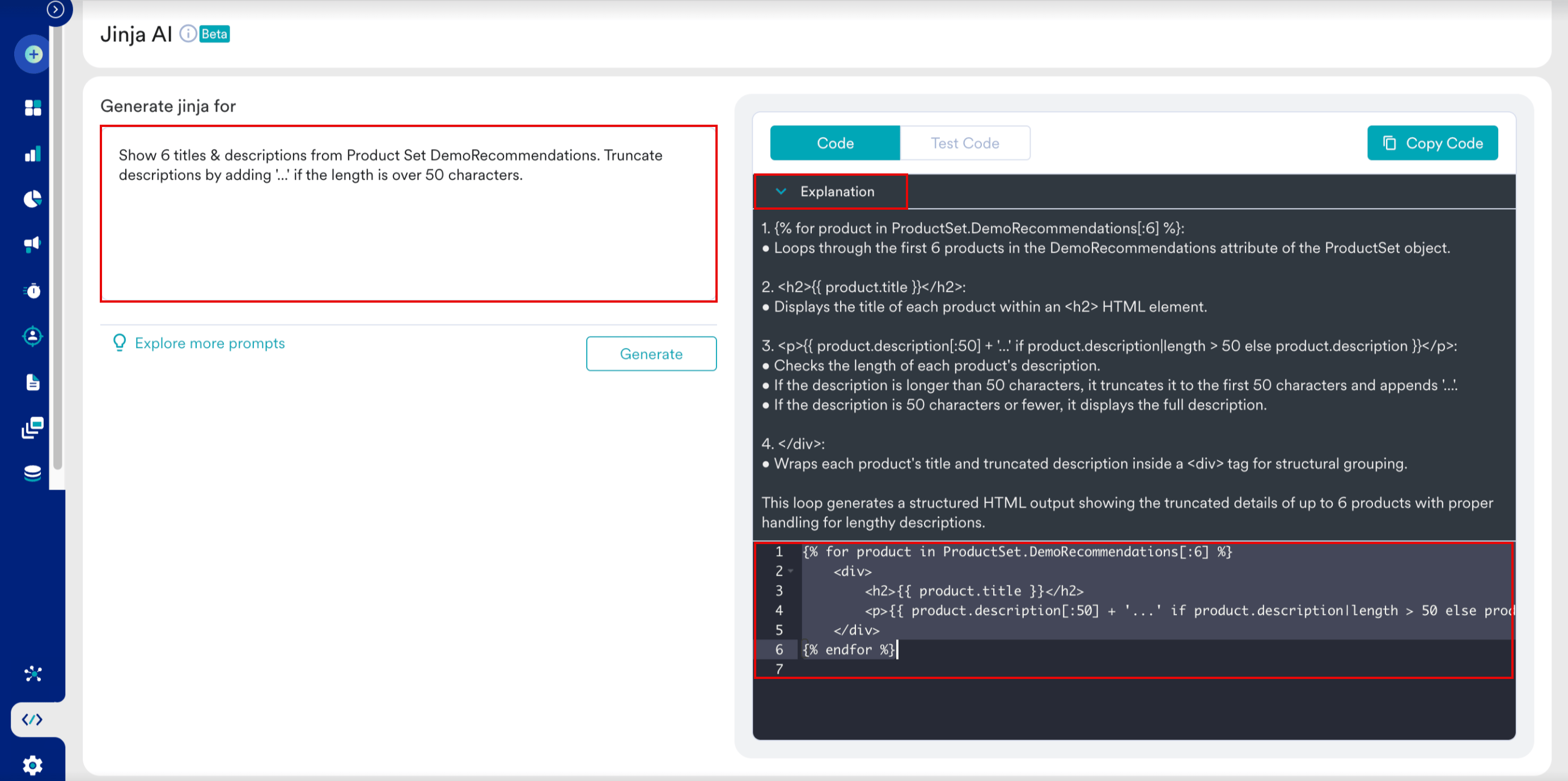 # Test Jinja Code
To test your code, perform the following steps:
1. On the Jinja AI page, click the **Test Code** tab.
2. In the **Select user by** list, select a test user profile, such as Email ID.
3. In the **User identifier value** box, type the user email ID and click **Fetch user data**.
4. Preview and verify the dynamic content appearance under the **Output** section.
# Test Jinja Code
To test your code, perform the following steps:
1. On the Jinja AI page, click the **Test Code** tab.
2. In the **Select user by** list, select a test user profile, such as Email ID.
3. In the **User identifier value** box, type the user email ID and click **Fetch user data**.
4. Preview and verify the dynamic content appearance under the **Output** section. 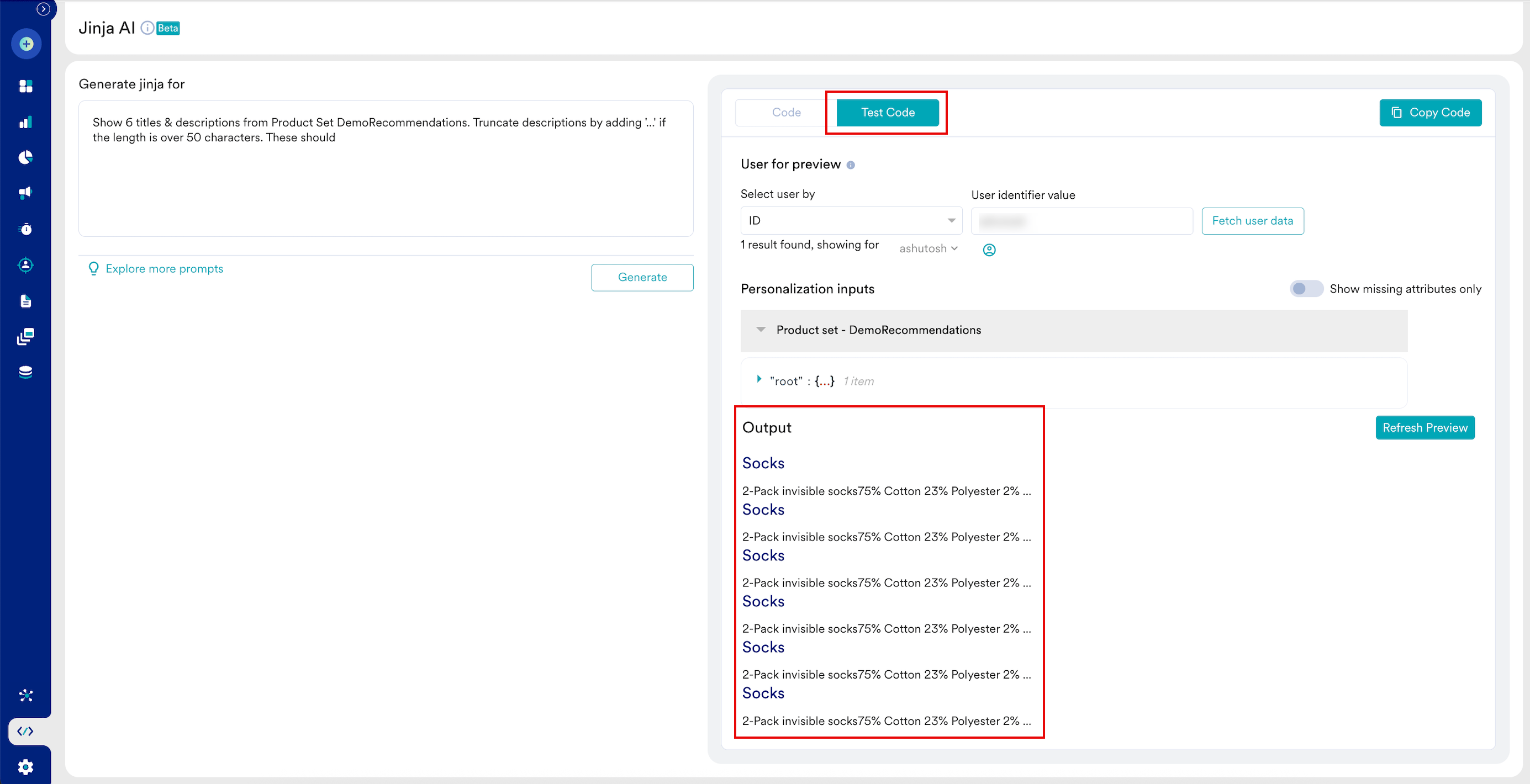 5. If your test code results in an error, click **Fix with AI** to regenerate the code.
6. After the test code results, click **Copy Code** and paste the Jinja code into the relevant personalization fields within your MoEngage campaign templates to implement dynamic content.
5. If your test code results in an error, click **Fix with AI** to regenerate the code.
6. After the test code results, click **Copy Code** and paste the Jinja code into the relevant personalization fields within your MoEngage campaign templates to implement dynamic content.