> ## Documentation Index
> Fetch the complete documentation index at: https://moengage-unity-sdk-initialization-split.mintlify.site/llms.txt
> Use this file to discover all available pages before exploring further.
# Why Does the Padding of an HTML Content Block Impact the Entire Template?
> Fix unintended global padding in MoEngage email templates by using inline CSS and avoiding duplicate body tags in custom HTML content blocks.
## Problem
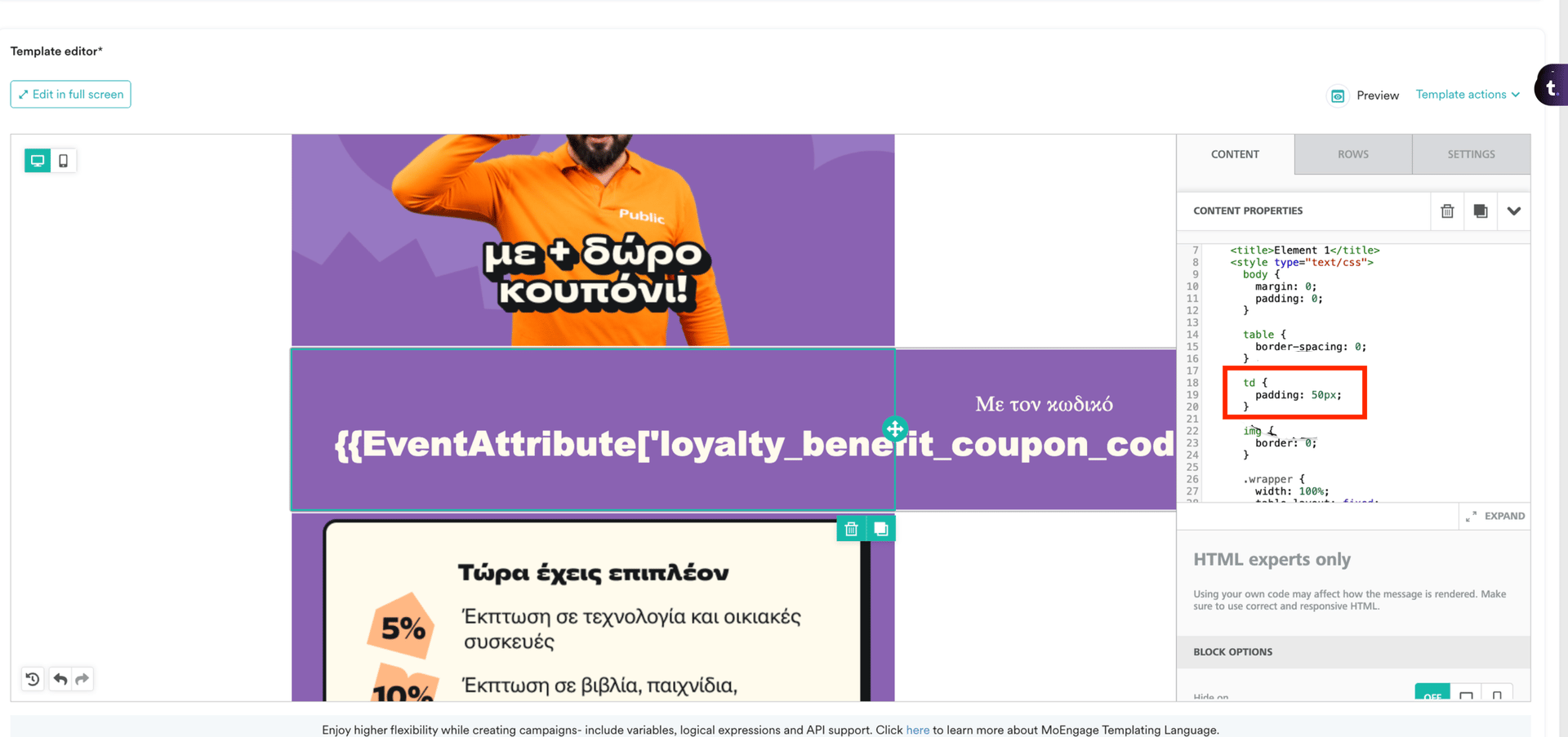
The padding intended to be applied only to a specific HTML *Content block* is being added to the entire template instead.
 ## Solution
* Use content tags and text elements to add content to the body.
* Avoid adding duplicate `` tags in *custom* *content blocks*.
* Adding global styles may cause unintended effects. For example, the styles applied also affect the editor's user interface (UI).
* If styling is required, use inline Cascading Style Sheets (CSS) to ensure it only affects the specific element.
It is recommended that the content be written in HTML code first, and then inline styling is applied to achieve the desired appearance.
## Solution
* Use content tags and text elements to add content to the body.
* Avoid adding duplicate `` tags in *custom* *content blocks*.
* Adding global styles may cause unintended effects. For example, the styles applied also affect the editor's user interface (UI).
* If styling is required, use inline Cascading Style Sheets (CSS) to ensure it only affects the specific element.
It is recommended that the content be written in HTML code first, and then inline styling is applied to achieve the desired appearance.