> ## Documentation Index
> Fetch the complete documentation index at: https://moengage-unity-sdk-initialization-split.mintlify.site/llms.txt
> Use this file to discover all available pages before exploring further.
# Why Does an HTML In-App Fail to Display When a URL Is Included Inside a Script Tag?
> Diagnose why an HTML in-app campaign fails to render when a URL is referenced inside a script tag.
## Problem
HTML in-app may fail when script tags are used on devices.
## Explanation
* Some HTML in-app includes the following script tag:
```text wrap theme={null}
```
* The tag embeds JavaScript code to enable validation and other JavaScript functionalities.
* Publishing an HTML in‑app campaign containing this script tag will cause an exception when viewed in the app, as shown in the screenshot:
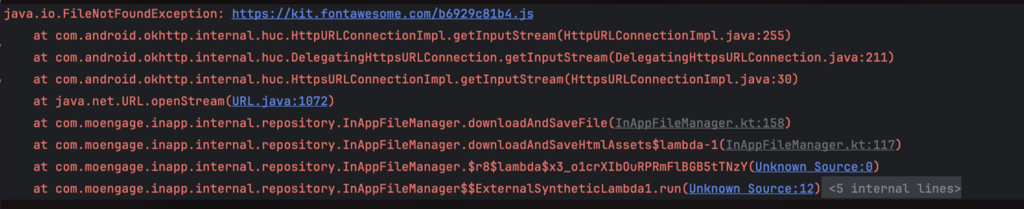 * The `FileNotFound` exception indicates that the JavaScript file URL `https://kit.fontawesome.com/b6929c81b4.js` in the script tag is invalid, preventing the HTML in‑app from loading on the device.
## Solution
Providing a valid JavaScript file URL in the script tag will stop exceptions and result in a successful HTML in‑app display when the app is reopened.
* The `FileNotFound` exception indicates that the JavaScript file URL `https://kit.fontawesome.com/b6929c81b4.js` in the script tag is invalid, preventing the HTML in‑app from loading on the device.
## Solution
Providing a valid JavaScript file URL in the script tag will stop exceptions and result in a successful HTML in‑app display when the app is reopened.