> ## Documentation Index
> Fetch the complete documentation index at: https://moengage-unity-sdk-initialization-split.mintlify.site/llms.txt
> Use this file to discover all available pages before exploring further.
# How to Avoid Common Push Notification Issues on iOS Devices Using iOS Swift version 8.x.x?
> Fix push impression tracking and image rendering on iOS with Swift SDK 8.x.x. Validate your appgroupid setup during MoEngage SDK initialization.
## Problem
Common issues with Push notifications, including Push Campaign impressions not being tracked and images not rendering even though Push notifications are successfully delivered to device with Swift version 8.x.x.
For Push Campaign impressions to be tracked, verify that the **Show iOS impressions** toggle on the MoEngage dashboard is turned on.
 ## Solution
Perform the following steps:
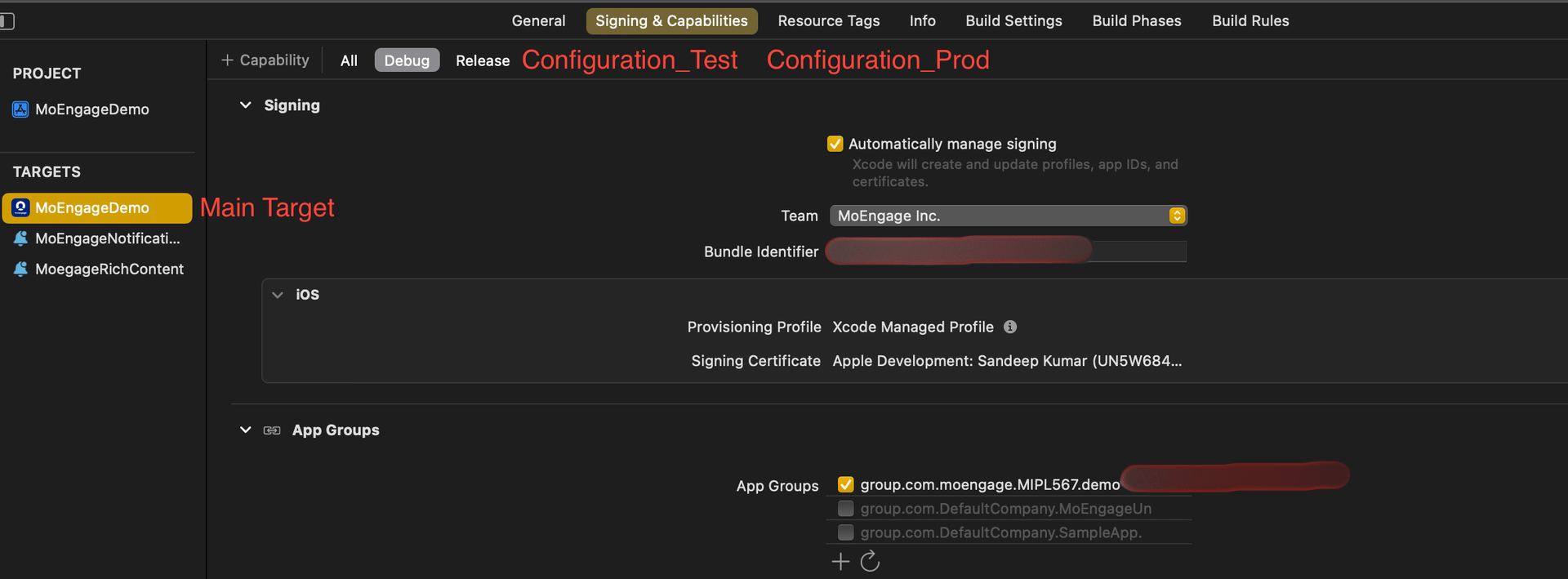
1. **Check for app\_group\_id in your project’s main target for each configuration**:
You can add the same app\_group\_id or different ones across configurations.
Issues may arise if your configurations use different Bundle Identifiers but share the same app\_group\_id. Specifically, the Notification Service Extension may fail if two apps with different Bundle Identifiers but the same app\_group\_id are installed on the same device.
To avoid this, you can use the same app\_group\_id across multiple configurations, but be aware that you won't be able to test all apps simultaneously on a single device.
## Solution
Perform the following steps:
1. **Check for app\_group\_id in your project’s main target for each configuration**:
You can add the same app\_group\_id or different ones across configurations.
Issues may arise if your configurations use different Bundle Identifiers but share the same app\_group\_id. Specifically, the Notification Service Extension may fail if two apps with different Bundle Identifiers but the same app\_group\_id are installed on the same device.
To avoid this, you can use the same app\_group\_id across multiple configurations, but be aware that you won't be able to test all apps simultaneously on a single device.
 2. **Check for app\_group\_id during SDK initialization**:
* If the SDK is initialized using info.plist, the APP\_GROUP\_ID key must be there inside the MoEngage key in your info.plist file.
* If the SDK is initialized using sdkConfig, the APP\_GROUP\_ID must be in the sdkConfig variable inside the AppDelegate file.\
**app\_group\_id in info.plist:**
2. **Check for app\_group\_id during SDK initialization**:
* If the SDK is initialized using info.plist, the APP\_GROUP\_ID key must be there inside the MoEngage key in your info.plist file.
* If the SDK is initialized using sdkConfig, the APP\_GROUP\_ID must be in the sdkConfig variable inside the AppDelegate file.\
**app\_group\_id in info.plist:**
 **app\_group\_id in sdkConfig variable:**
```swift Swift theme={null}
var sdkConfig = MOSDKConfig.init(withAppID: "XXXXXXXXXXXXXXXX")
sdkConfig.moeDataCenter = .data\_center\_0X
sdkConfig.appGroupID = "group.com.XXXXXXXXXXXXXXXX"
```
```Objective-C Objective-C theme={null}
MOSDKConfig* sdkConfig = [[MOSDKConfig alloc] initWithAppID: @"XXXXXXXXXXXXXXXX"];
sdkConfig.moeDataCenter = MODataCenterData_center_0X;
sdkConfig.appGroupID = @"group.com.XXXXXXXXXXXXXXXX";
```
3. **Check for a Notification Service Extension Target**:
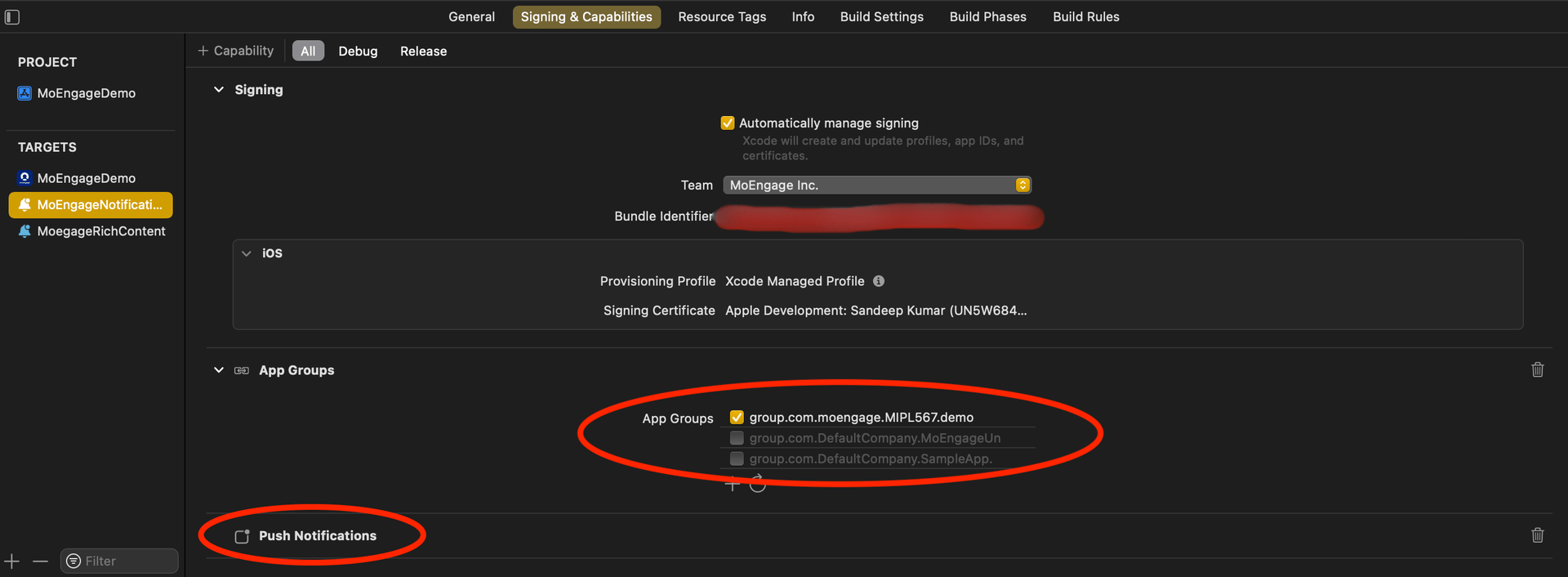
* **Enable Push Notifications**: In the extension target's Signing & Capabilities section, make sure to enable Push Notifications and add the AppGroupId.
**app\_group\_id in sdkConfig variable:**
```swift Swift theme={null}
var sdkConfig = MOSDKConfig.init(withAppID: "XXXXXXXXXXXXXXXX")
sdkConfig.moeDataCenter = .data\_center\_0X
sdkConfig.appGroupID = "group.com.XXXXXXXXXXXXXXXX"
```
```Objective-C Objective-C theme={null}
MOSDKConfig* sdkConfig = [[MOSDKConfig alloc] initWithAppID: @"XXXXXXXXXXXXXXXX"];
sdkConfig.moeDataCenter = MODataCenterData_center_0X;
sdkConfig.appGroupID = @"group.com.XXXXXXXXXXXXXXXX";
```
3. **Check for a Notification Service Extension Target**:
* **Enable Push Notifications**: In the extension target's Signing & Capabilities section, make sure to enable Push Notifications and add the AppGroupId.
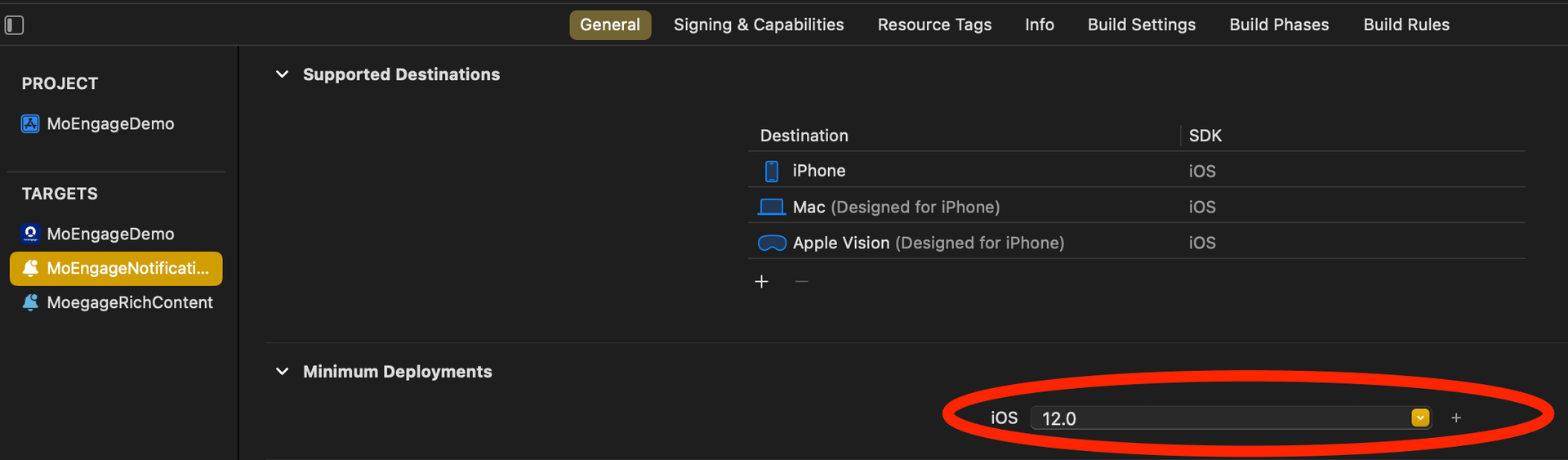
 * **Align the Minimum Deployment iOS Version**: Ensure that the minimum deployment iOS version of the Notification Service Extension matches the iOS version of the main app.
 4. Integrate the MORichNotification Framework into the Notification Service Extension target.
```swift Swift theme={null}
target 'MoEngageDemo' do
use_frameworks!
pod 'MoEngage-iOS-SDK'
end
target 'MoEngageNotificationService' do
use_frameworks! #use use_frameworks only if included in main target as in above scenario
pod 'MoEngageRichNotification'
end
```
5. NotificationService.swift file looks like this:
```swift Swift theme={null}
import UserNotifications
import MoEngageRichNotification
class NotificationService: UNNotificationServiceExtension {
var contentHandler: ((UNNotificationContent) - Void)?
var bestAttemptContent: UNMutableNotificationContent?
override func didReceive(_ request: UNNotificationRequest, withContentHandler contentHandler: @escaping (UNNotificationContent) - Void) {
MORichNotification.setAppGroupID("group.com.XXXXXXXXXXXXXXXX")
self.contentHandler = contentHandler
bestAttemptContent = (request.content.mutableCopy() as? UNMutableNotificationContent)
MORichNotification.handle(richNotificationRequest: request, withContentHandler: contentHandler)
}
override func serviceExtensionTimeWillExpire() {
// Called just before the extension will be terminated by the system.
// Use this as an opportunity to deliver your "best attempt" at modified content, otherwise the original push payload will be used.
if let contentHandler = contentHandler, let bestAttemptContent = bestAttemptContent {
contentHandler(bestAttemptContent)
}
```
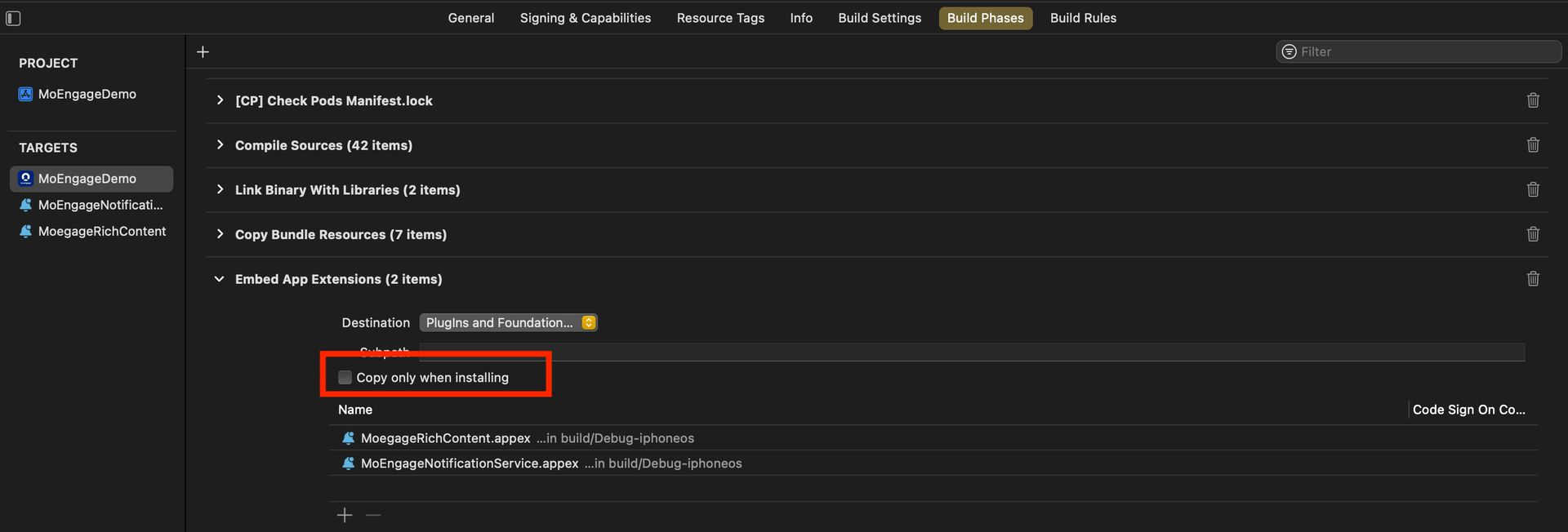
6. **Check Build Phases for the Main App Target**: In the Build Phases section of the main app target, locate the Embed App Extensions / Embed Foundation Extensions section. Ensure that the **Copy only when installing** option is unchecked.
4. Integrate the MORichNotification Framework into the Notification Service Extension target.
```swift Swift theme={null}
target 'MoEngageDemo' do
use_frameworks!
pod 'MoEngage-iOS-SDK'
end
target 'MoEngageNotificationService' do
use_frameworks! #use use_frameworks only if included in main target as in above scenario
pod 'MoEngageRichNotification'
end
```
5. NotificationService.swift file looks like this:
```swift Swift theme={null}
import UserNotifications
import MoEngageRichNotification
class NotificationService: UNNotificationServiceExtension {
var contentHandler: ((UNNotificationContent) - Void)?
var bestAttemptContent: UNMutableNotificationContent?
override func didReceive(_ request: UNNotificationRequest, withContentHandler contentHandler: @escaping (UNNotificationContent) - Void) {
MORichNotification.setAppGroupID("group.com.XXXXXXXXXXXXXXXX")
self.contentHandler = contentHandler
bestAttemptContent = (request.content.mutableCopy() as? UNMutableNotificationContent)
MORichNotification.handle(richNotificationRequest: request, withContentHandler: contentHandler)
}
override func serviceExtensionTimeWillExpire() {
// Called just before the extension will be terminated by the system.
// Use this as an opportunity to deliver your "best attempt" at modified content, otherwise the original push payload will be used.
if let contentHandler = contentHandler, let bestAttemptContent = bestAttemptContent {
contentHandler(bestAttemptContent)
}
```
6. **Check Build Phases for the Main App Target**: In the Build Phases section of the main app target, locate the Embed App Extensions / Embed Foundation Extensions section. Ensure that the **Copy only when installing** option is unchecked.
 7. **Ensure Consistent appGroupId Across Configurations**: Verify that the appGroupId is consistent across all schemes and configurations (e.g. Debug/Release/QA/UAT) in the project.
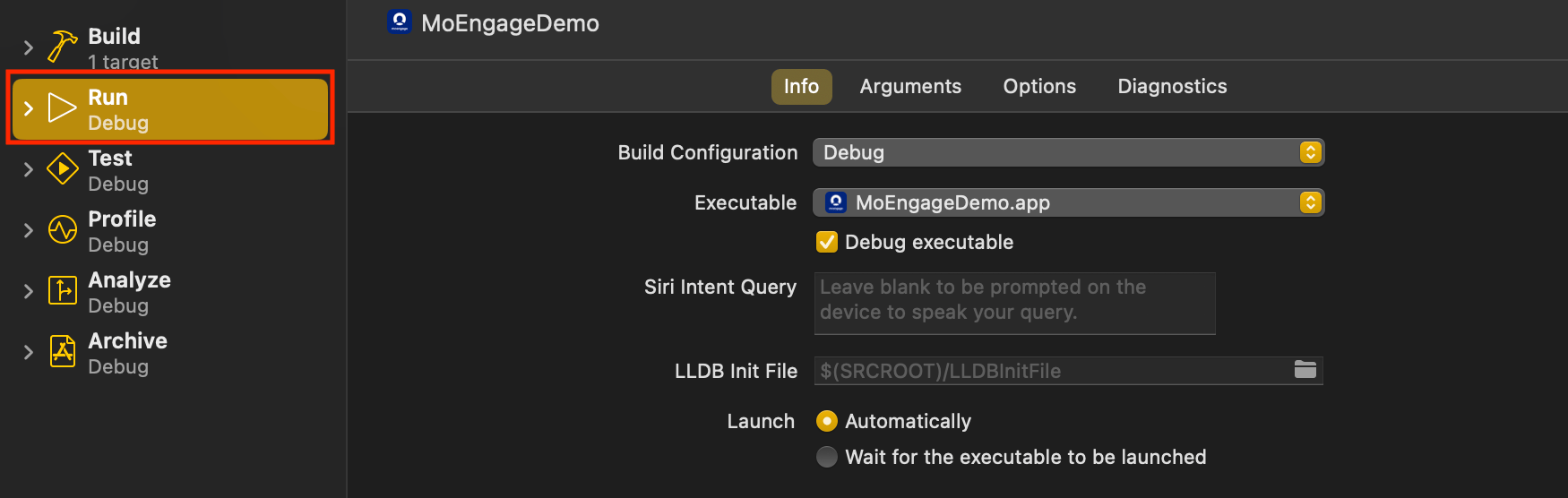
8. **Align Build Configuration**: When running or archiving the project, ensure that the Build Configuration for the Main Target and Notification Service Extension Target points to the same scheme/configuration.
7. **Ensure Consistent appGroupId Across Configurations**: Verify that the appGroupId is consistent across all schemes and configurations (e.g. Debug/Release/QA/UAT) in the project.
8. **Align Build Configuration**: When running or archiving the project, ensure that the Build Configuration for the Main Target and Notification Service Extension Target points to the same scheme/configuration.