> ## Documentation Index
> Fetch the complete documentation index at: https://moengage-unity-sdk-initialization-split.mintlify.site/llms.txt
> Use this file to discover all available pages before exploring further.
# DLT impact on SMS
> Understand how India's DLT regulations affect your SMS campaigns in MoEngage, including required entity IDs, template IDs, and sender registration.
To be compliant with DLT regulations, you will have to make a few changes to make in your SMS settings. This will ensure no interruptions in your current/future SMS campaigns. For more information, refer to the [SMS DLT regulations and registration process.](/user-guide/campaigns-and-channels/sms-mms-and-rcs/compliance-and-deliverability/messaging-regulations-for-india)
* Since DLT regulations are applicable only in India, these changes are applicable only if you are sending SMS to Indian mobile numbers.
* The regulatory process requires scrubbing the Entity IDs, Sender IDs, and Template IDs with all the operators.
* Ensure that all the content templates are uploaded to the operator DLT portal.
In this article, we will list the areas impacted due to DLT regulation and what you need to do about them.
## Update DLT-specific details with your SMS provider
As per the DLT platform scrubbing requirements, operators will accept and deliver messages only if they receive the following information in every message submission:
* Principal Entity ID
* Sender ID
* Template ID
We've listed the instruction to be followed for the SMS providers Gupshup and Kaleyra below:
1. Login to the [Gupshup portal](https://enterprise.smsgupshup.com/) using your Account login details and OTP.
2. Go to the DLT Template module. There are two tabs: Single Template and Upload Template List.
3. In the Single Template section, list the following and click *SUBMIT*.
* Template Name
* Template Id (URN)
* Transactional (yes/no)
* DLT Message Type
* Message Type
* Business Category
* Mask
* Template content.
4. In the Upload template list section, list the same details as above. This is a bulk upload option where you can upload many templates simultaneously.
Kaleyra has launched a new service - "[DLT AI](https://messaging.kaleyra.com/support/solutions/folders/3000018909)", which lets you continue the message submission process without ANY changes. You will only have to do the following:
1. Submit the Entity ID and Sender ID. For more information, refer to [Submitting Entity and Sender ID in Kaleyra](https://support.kaleyra.com/support/solutions/articles/3000102533-principle-entity-id-addition-%E2%80%93-kaleyra-platform).
2. Submit the Template ID. For more information, refer to [Kaleyra Templates](https://support.kaleyra.com/support/solutions/articles/3000102535-template-addition-kaleyra-platform).
Once you have added the Entity ID and Template ID on Kaleyra’s Platform, these details will be auto-mapped for you, and the requests will be submitted to the operators.
* Make sure you have done the above steps for both promotional and transactional SMS.
* If you are sending SMS using Custom Connectors, contact your SMS providers to understand how the DLT fields - Entity ID, Sender ID, and Template IDs need to be passed to them.
## Update settings on the MoEngage Dashboard
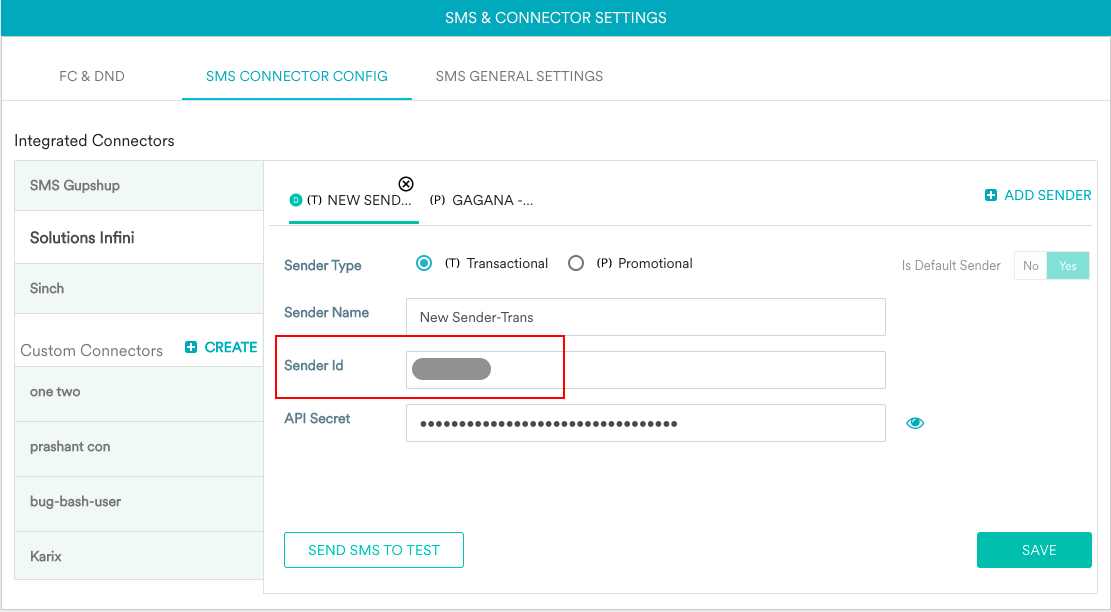
If you use SMS Gupshup or Kaleyra as integrated providers, update the Sender IDs in the MoEngage Dashboard. Enter the Header ID registered and approved on the DLT platform in the Sender ID field for all the senders - for both transactional and promotional SMS. This will ensure that your SMS campaigns are not impacted.
 ## Configure SMS as per the approved template
As per template scrubbing guidelines, you must adhere to your SMS content with the approved templates. If the SMS does not match any of the approved templates, your SMS will be rejected.
You can pass dynamic or personalized values in *#var#* parameter of the approved template. Each *#var#* has a limit of 30 characters. You can use a combination of *#var#* to accommodate more number of characters. Configure the templates as required and get them approved.
## Configure SMS as per the approved template
As per template scrubbing guidelines, you must adhere to your SMS content with the approved templates. If the SMS does not match any of the approved templates, your SMS will be rejected.
You can pass dynamic or personalized values in *#var#* parameter of the approved template. Each *#var#* has a limit of 30 characters. You can use a combination of *#var#* to accommodate more number of characters. Configure the templates as required and get them approved.