

Problem
Common issues with Push notifications, including failed delivery, screen navigation, deep linking, and rich landing, are occurring on iOS devices using Native iOS, Objective-C, and MoEngage-iOS-SDK (Versions 7.x.x, 8.x.x, 9.x.x).Solution
Perform the following steps:- Disable Firebase Proxy:
- If you are not using Firebase push notifications, disable the Firebase proxy by adding the FirebaseAppDelegateProxyEnabled key in info.plist with the value Boolean = False/NO.
- Test the push notification. If it works, no further action is needed.
- If you are using Firebase push notifications, skip this step and proceed with the following steps.
- Set UNUserNotificationCenterDelegate:
- In AppDelegate.m, set UNUserNotificationCenterDelegate in the didFinishLaunch method.
- If you are initializing Firebase in didFinishLaunch, do so before initializing the MoEngage SDK.
- Ensure UNUserNotificationCenterDelegate is set at the start of this method.
Objective-C
- Extend AppDelegate.h:
- Extend AppDelegate.h to conform to UNUserNotificationCenterDelegate. Your AppDelegate.h must resemble the following code snippets:
Objective-C
- Extend AppDelegate.h to conform to UNUserNotificationCenterDelegate. Your AppDelegate.h must resemble the following code snippets:
- Disable MoEngage Proxy:
- Add MoEngageAppDelegateProxyEnabled key in info.plist with the value Boolean = False/NO
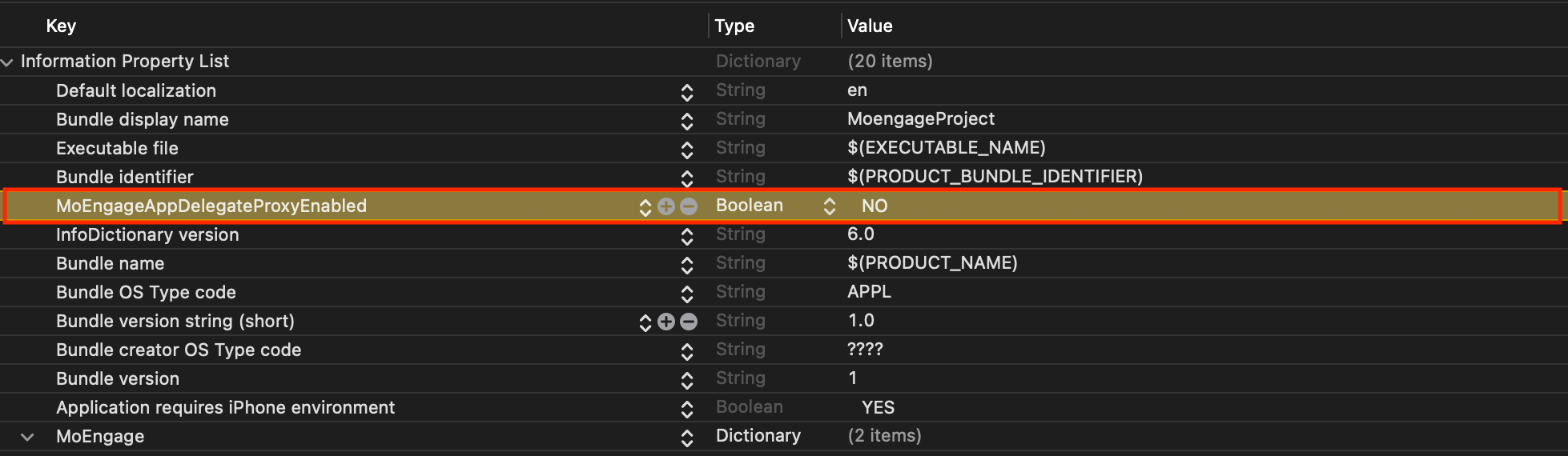
- Add MoEngageAppDelegateProxyEnabled key in info.plist with the value Boolean = False/NO
- Pass Push Notification Token Manually:
- Use the didRegisterForRemoteNotificationsWithDeviceToken function of AppDelegate.m to pass the push notification token manually.
Objective-C
- Use the didRegisterForRemoteNotificationsWithDeviceToken function of AppDelegate.m to pass the push notification token manually.
- Implement UNUserNotificatoinCenter Delegate Functions:
- Ensure UNUserNotificatoinCenter Delegate functions are implemented in AppDelegate.m.
Objective-C
- Ensure UNUserNotificatoinCenter Delegate functions are implemented in AppDelegate.m.